Archiving flags
Archive unused flags, resolve dependency checks, and restore when needed.
Overview
This topic explains how to archive flags you no longer need in active operations.
Archiving removes the flag from active list views while preserving it for historical reference and optional restoration.
At runtime, archived flags are treated as OFF and serve the configured OFF variation (offVariationID).
SDK fallback arguments in code are only used when SDK state is not ready or the flag key is missing.
Archive flags
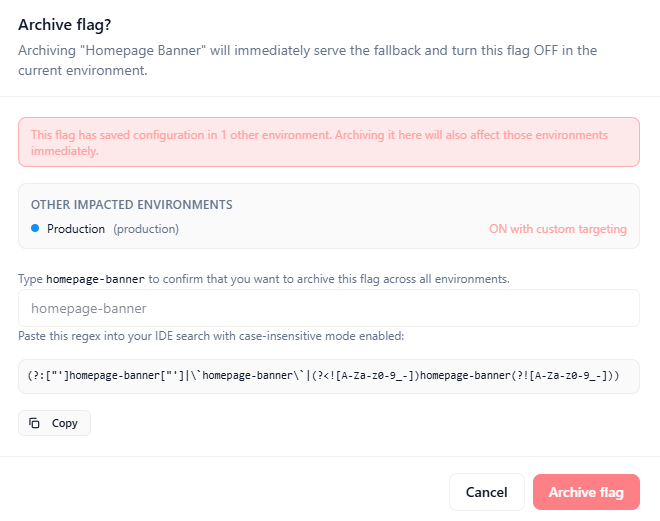
Archive checks evaluate whether the flag has dependencies or recent usage that should be reviewed first.
Some dependencies block archiving, while others are warnings that should still be assessed before final action.
Archiving is not the same as deleting: the flag still exists and continues to resolve to its OFF variation until restored or deleted.
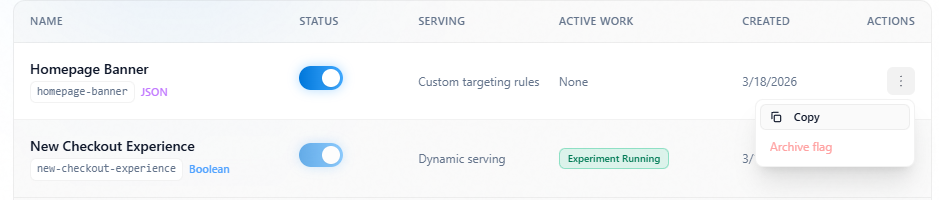
- Open the Flags list and locate the target flag.
- Open row actions and choose
Archive flag. - Review dependency and usage checks in the archive confirmation panel.
- Confirm archive.
Archive action
Resolve dependencies
Before archiving, review prerequisites.
Archive checks panel
View and restore flags
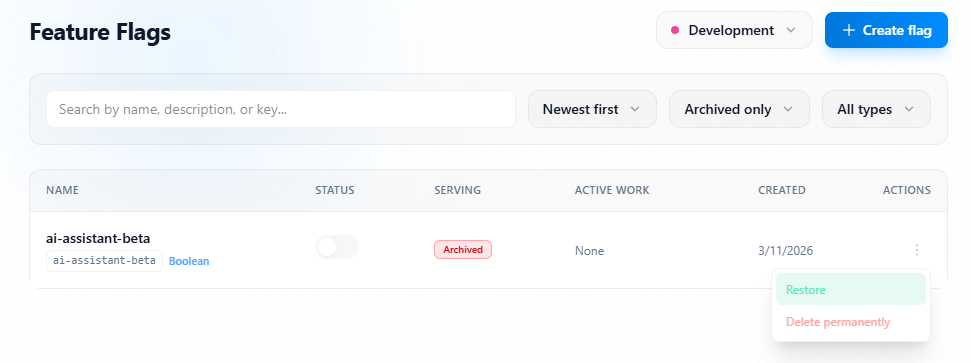
Use lifecycle filters in the Flags list to view archived flags.
Restoring returns the flag to active evaluation paths, so restoration should be validated in dependent environments.
- Filter the Flags list to lifecycle
Archived only. - Open the archived flag.
- Choose
Restorefrom lifecycle actions. - Review recent evaluation context before confirm.
- Confirm restore.
Restore flow